
As well as ensuring system compliance with supporting technologies, with the upcoming upgrades of the MYOB Acumatica application, MYOB are deploying a new “Modern UI” (User Interface).
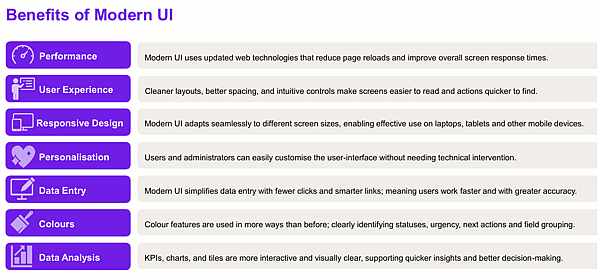
The adoption of the Modern UI ensures that the application continues to support more functional technologies as these become available with MYOB noting the benefits of the new UI as including the following:
Modern UI Upgrade/Adoption Process
The transition for existing sites to the Modern UI is being rolled out on a staggered basis from now through to mid-2027 as part of MYOB’s scheduled new Release and Upgrade schedule.
It is recommended that the transition to the Modern UI is made as a separate action once the site has been upgraded to a supported version of Acumatica.
MYOB has made available to Helm the tools required to transition any customisations to the new UI which we will trial for each client in Sandbox sites as part of our recommended transition process which will include Users testing ahead of then applying to the ‘live’ site.
All MYOB Acumatica sites will need to have transitioned to the new UI before they upgrade to v2027 and onwards as MYOB will be disabling the existing “Classic UI” at that time. The upgrading of sites to the first v2027 Release is scheduled to start from May/June 2027 so we collectively need to have transitioned your site across to the new UI by then.
What action is required from you?
As with the other upgrades, our Support team will be in touch when we would like to consider the transition of your site to the Modern UI. We will discuss and agree on a suitable migration process, including pre-upgrade testing etc.
Should you wish to discuss the timing of this for your site, or have any other questions, please email Felicity.